HOOP
A calmer, data-honest interface on an open-source wearable client: new brand, rebuilt Home and a native backup bridge, on the MIT-licensed OpenStrap Edge engine.
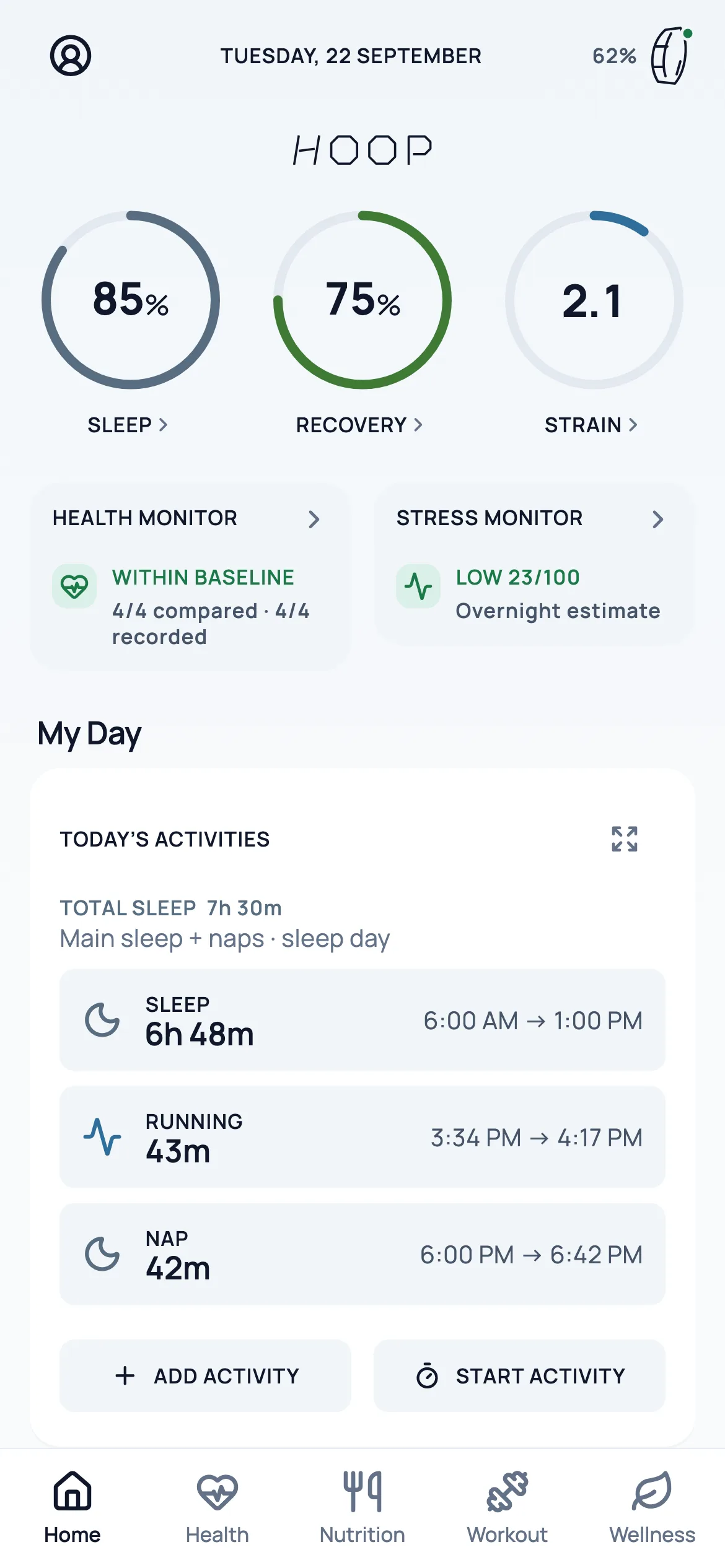
- Rings with values inside
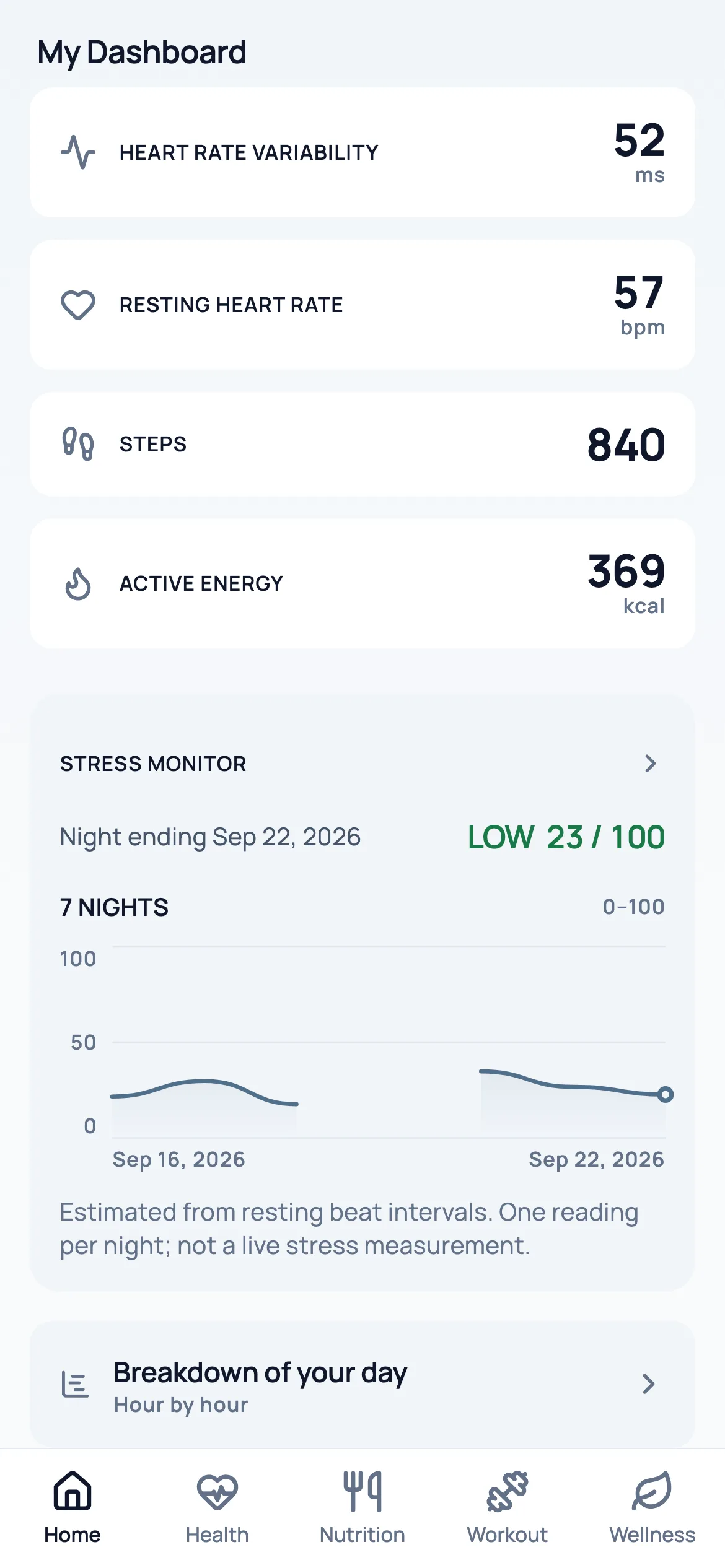
- Health & Stress monitors
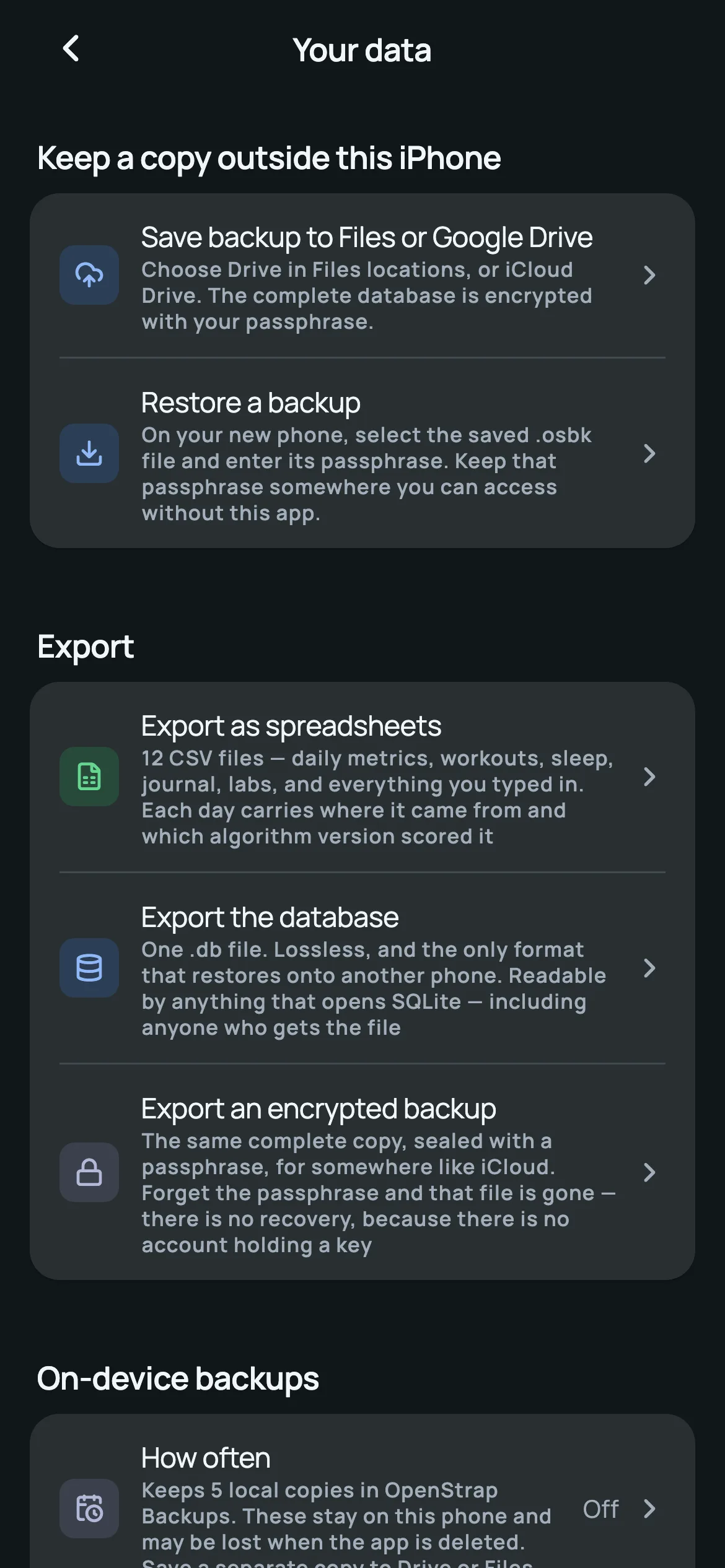
- Backup to Files or Drive
- New mark & icon system
- Discipline
- Mobile
- Year
- 2026
- Authorship
- Customised open source
- Status
- Role
- My layer: redesign, rebrand, UI and contrast work, a native backup bridge, reliability fixes and the iOS build.
- Surfaces
- iOS app · personal build
- Languages
- EN · DE · ES · FR · HI · ZH
- Stack
- Flutter · Dart · Swift · UIKit document picker · SQLite (upstream) · flutter_test · Xcode
Survey — context and problem.
The problem
An excellent open-source engine behind a beta-feeling interface — and no easy way to keep a backup off the phone.
OpenStrap Edge is an open-source Flutter app (MIT) that pairs with a WHOOP band over Bluetooth and computes sleep, recovery and strain on the phone — no subscription, no cloud. Its engine, from the reverse-engineered protocol to the analytics and background sync, is the work of the OpenStrap contributors.
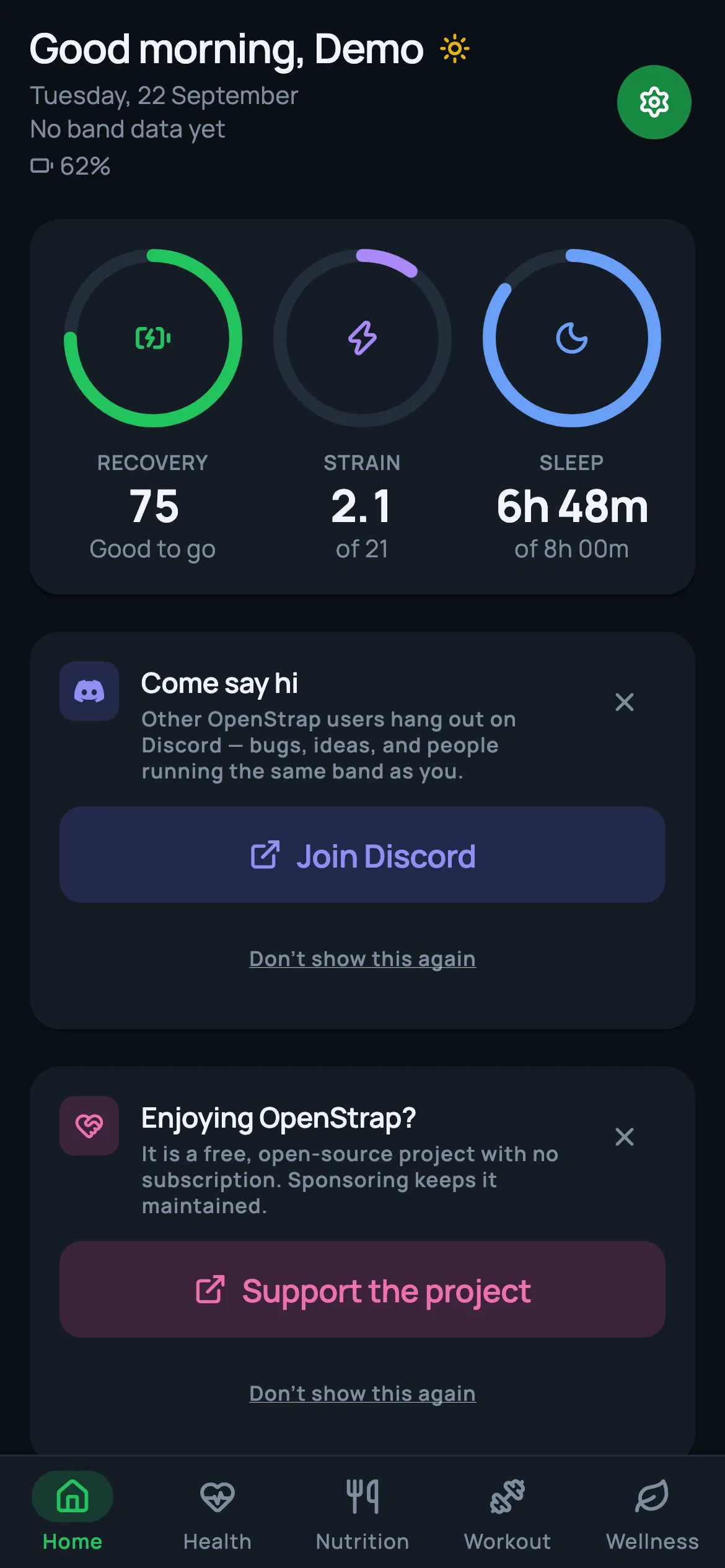
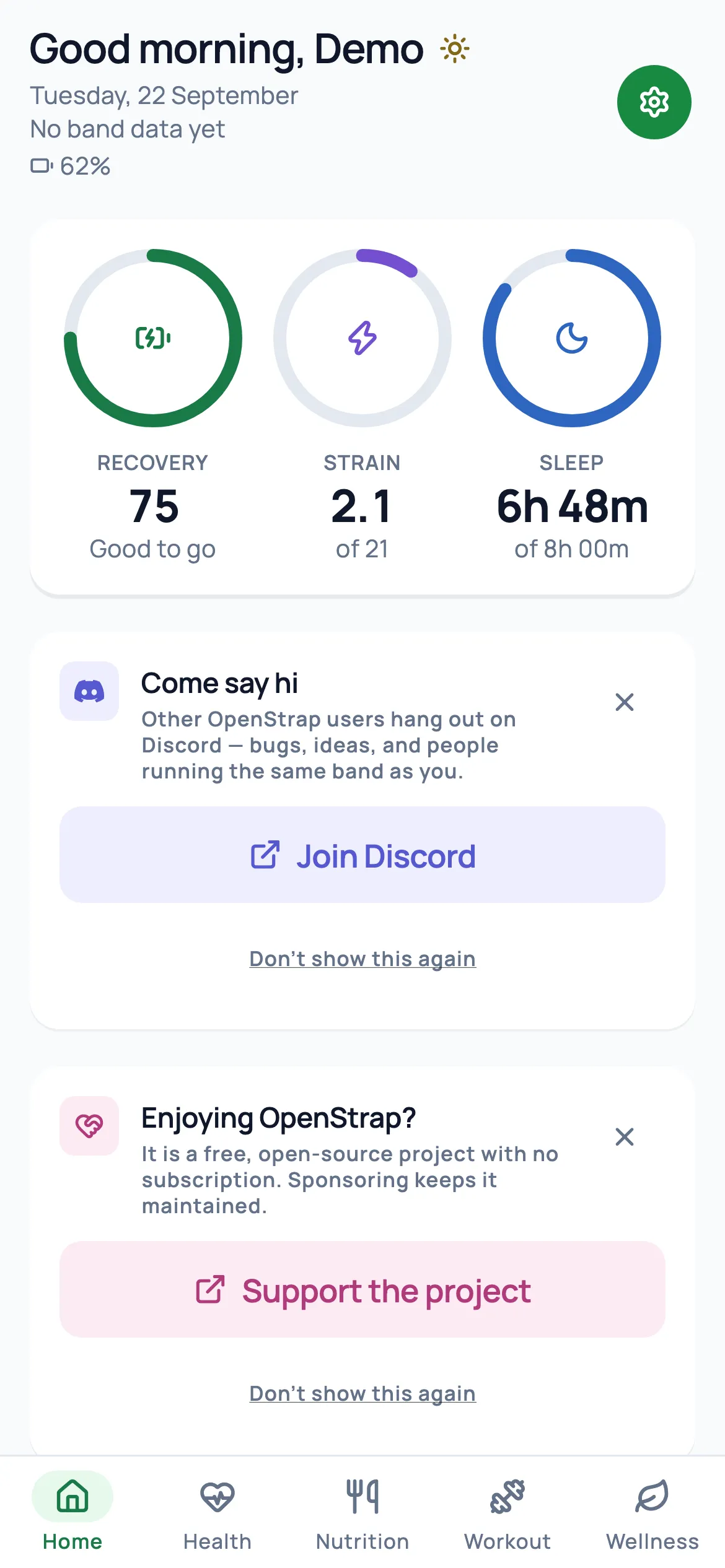
Its interface read like a community beta. Home opened with a greeting and a gear button; the rings carried icons while the numbers sat underneath; mascot illustrations, Discord invitations and sponsorship prompts competed with the data. There was no simple way to move the app’s encrypted backup off the phone, so a lost or replaced iPhone could mean lost history.
HOOP is my personal build for daily use. The brief I set myself: keep the upstream engine exactly as it is, and redesign the layer I actually look at every morning — the brand, the Home dashboard, the colour system — and add a way to keep a copy of the data outside the phone.
Authorship — who built what.
- Upstream
- OpenStrap Edge
- Licence
- MIT
My layer
- New brand: geometric H mark, wordmark and icon sets generated from one vector source
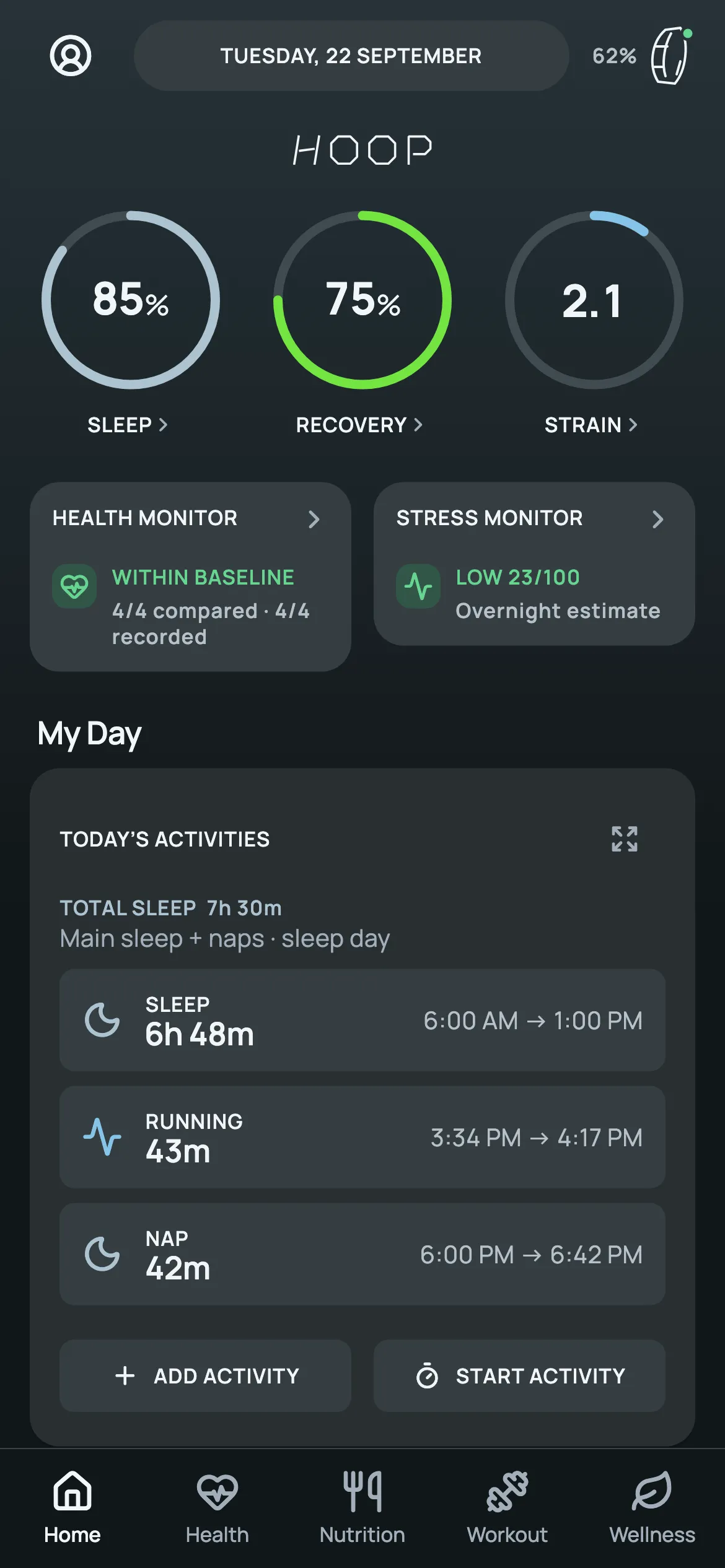
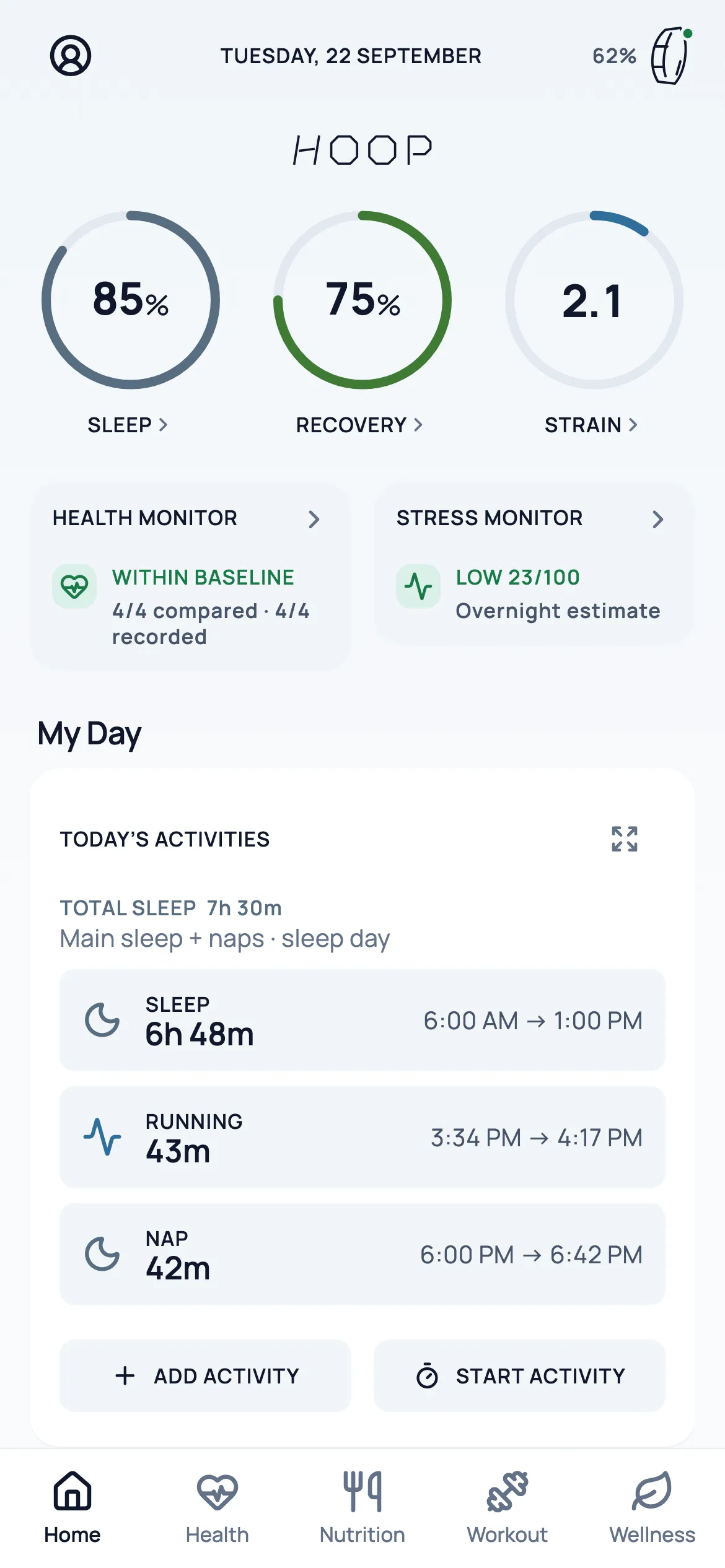
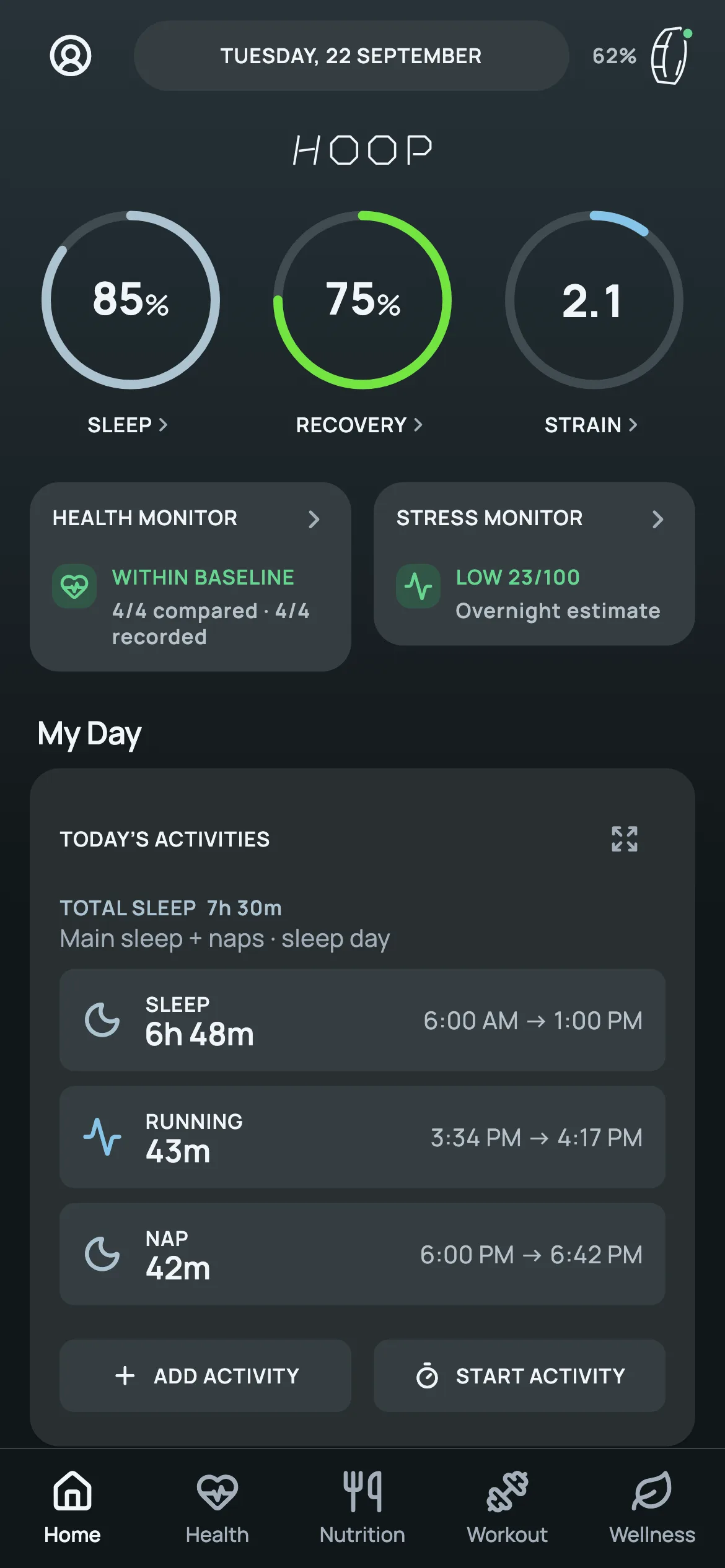
- Rebuilt Home: Sleep → Recovery → Strain rings with values inside, Health and Stress monitors, My Day
- Graphite palette and score colours, covered by a WCAG contrast test sweep
- Native Swift bridge to save the encrypted backup to Files or Google Drive
- Concurrency and lifecycle fixes, and 21 new automated tests
- Personal iOS signing and build setup
AI in the loop
I build with AI coding agents — Codex, Claude Code, Antigravity. Spec, architecture decisions, review, QA, deployment and handover are mine.
Agents on this project: Codex · Antigravity
Before and after

Credits & notes
- Built on OpenStrap Edge by the OpenStrap contributors (MIT). Bluetooth protocol, analytics and sync are upstream work.
- WHOOP is a trademark of WHOOP, Inc. and is named only as the compatible device. HOOP is a personal build, not affiliated with WHOOP and not distributed.
- All screens are rendered with synthetic demo data; no personal health data is shown.
Plan — the system, drawn first.
The solution
My layer on OpenStrap Edge: a new brand and icon system, a rebuilt Home with honest monitors, a graphite palette with contrast tests, a native Files / Drive backup bridge and reliability fixes.
The rule was simple: don’t touch the engine. Everything below the interface — Bluetooth protocol, on-device analytics, storage — stays upstream. On top of it, HOOP gets its own mark and wordmark, drawn once as vectors and rendered into every iOS and Watch icon size by a small generator with an alpha-free PNG encoder, as App Store icons require. Home is rebuilt around three rings with values inside, followed by two monitors that compare overnight signals with a personal baseline and say “calibrating” rather than guess. A graphite palette with one colour per score replaces the mascots and community prompts, and a contrast test sweep keeps every pairing readable. A native Swift bridge hands the encrypted backup to the iOS document picker, so it can go to Files or Google Drive. Fixes to a queue race, iOS logging and hidden-tab refreshes ship with 21 new tests.
Module key
- Compact header: date switcher and a device badge with battery and status
- Sleep, Recovery and Strain rings with values inside
- Health Monitor: four overnight signals against a personal baseline
- Stress Monitor with a 7-night chart that keeps gaps visible
- My Day with sleep periods, naps and sessions; My Dashboard tiles
- Graphite dark theme and a light theme, both contrast-tested
- Encrypted backup to Files or Google Drive, and restore
- Dark and light alternate app icons
Key decisions
-
Why fork the interface, not the engine
The upstream engine is mature and actively maintained. Leaving it untouched keeps a clear line between the contributors’ work and mine, and leaves the door open to upstream updates.
-
Why the monitors abstain
A health number shown with false confidence is worse than none. The monitors compare against a trusted personal baseline, show “calibrating” until one exists, and keep gaps in the 7-night chart visible.
-
Why icons come from one vector
The mark, the splash screen and every icon size are rendered from the same paths, so the brand never drifts between sizes — and the no-alpha rule for App Store icons is enforced in code.
-
Why backups go through the Files picker
The user chooses the destination — iCloud Drive, Google Drive or any Files provider — and the app passes a file path across the bridge, never the database bytes in memory.
Details — the mobile screens.
Every mobile screen 04
Materials schedule — the stack, and why.
| Layer | Material | Why |
|---|---|---|
| 01Data | Upstream: on-device SQLite (OpenStrap Edge) | Health data stays on the phone; HOOP adds a user-controlled copy outside it. |
| 02Logic | Dart · monitor and day-data models | New monitor logic reads the stored confidence and abstains below a threshold. |
| 03Intelligence | Upstream on-device analytics (unchanged) | Sleep, recovery, strain and stress come from OpenStrap’s engine — credited, not claimed. |
| 04Interface | Flutter · custom painters · graphite theme | One vector source for brand and icons; a calmer, data-first Home. |
| 05Infra | Swift MethodChannel · UIDocumentPicker · flutter_test goldens | Native backup export, and golden renders with synthetic data for every screen shown here. |
Stack
Completion — outcome and links.
Verified facts
- new automated tests
- 21
- Source: local working tree, Sep 2026
- icon sets rendered from one vector source
- 3
- Source: local working tree, Sep 2026
Want to see it running?
I can walk you through the live system on demo data and explain the decisions behind it.
Request a walkthrough